在Python开发过程中,你是否遇到过代码重复冗余、难以维护的问题?是否想过如何优雅地复用代码,让程序结构更加清晰?继承作为面向对象编程的三大特性之一,正是解决这些问题的利器。
本文将带你从零基础开始,深入掌握Python继承的方方面面。无论你是刚接触Python的新手,还是想深入理解继承机制的进阶开发者,这篇文章都将为你提供完整的学习路径。我们将通过实际的代码示例,让你彻底理解继承的本质,掌握在实际项目中的应用技巧。
🔍 什么是继承?为什么要使用继承?
问题分析
在日常开发中,我们经常会遇到这样的场景:
Python# 没有使用继承的代码 - 存在大量重复
class Dog:
    def __init__(self, name, age):
        self.name = name
        self.age = age

    def eat(self):
        print(f"{self.name}正在吃饭")

    def sleep(self):
        print(f"{self.name}正在睡觉")

    def bark(self):
        print(f"{self.name}正在汪汪叫")

class Cat:
    def __init__(self, name, age):
        self.name = name
        self.age = age

    def eat(self):
        print(f"{self.name}正在吃饭")

    def sleep(self):
        print(f"{self.name}正在睡觉")

    def meow(self):
        print(f"{self.name}正在喵喵叫")
可以看到,Dog和Cat类中存在大量重复的代码,这违反了DRY原则(Don't Repeat Yourself)。
在实际的Python开发中,我们经常需要编写稳定易维护的类:打开文件、连接数据库、启动串口,与硬件交互的上位机开发尤甚。很多问题并不是出在业务逻辑,而是出在对象生命周期管理:何时初始化资源?何时释放?本文聚焦面向对象中的两个关键点——构造函数与析构函数。我们将通过问题分析、可落地的解决方案与可直接复制的代码示例,帮你搭建“创建即可用、销毁不泄露”的类设计,提升你的编程技巧与项目稳定性。
🧩 问题分析
❗ 为什么仅仅“能跑”还不够?
- 资源泄露隐患:文件句柄、串口、Socket若忘记关闭,可能导致上位机开发中设备占用、端口被锁。
- 初始化不一致:构造逻辑散落在多处,导致对象状态不完整,出现“有时能用,有时异常”的不确定性。
- 异常处理缺口:构造阶段抛错后,半初始化对象残留,后续释放工作容易遗漏。
🧠 Python 的“构造/析构”到底是什么?
- 构造函数:
__init__(self, ...),在对象创建后被调用,用于初始化对象状态。注意它不是“真正分配内存”的地方(那是__new__)。 - 析构函数:
__del__(self),在对象被垃圾回收时“可能”被调用,不保证时机与顺序,尤其在解释器退出阶段。过度依赖会引发不可预期问题。 - 更好的资源释放:上下文管理协议(
__enter__/__exit__)和contextlib才是强烈建议的方式。
🧭 解决方案
✅ 1. 明确职责边界
- 构造函数只做“最小必要初始化”,避免做可能失败的重活(如复杂网络握手)。
- 将重操作推迟到显式的
connect()、open()等方法,或使用上下文管理器保障释放。
✅ 2. 使用上下文管理管理资源(优先)
- 为资源类实现
__enter__/__exit__,用with确保异常也会正确释放。 - 对于多资源组合,使用
contextlib.ExitStack简化清理。
✅ 3. 谨慎使用 __del__
- 仅作为兜底(best-effort),不要在其中抛异常或做关键逻辑。
- 避免在
__del__里引用全局模块或其他可能已被回收的对象。
✅ 4. 提供显式的 close()/dispose() 方法
- 让调用者拥有可控关闭点,并在
__exit__中复用该方法,形成单一释放通道。
✅ 5. 记录状态与幂等释放
- 使用
_closed标记,确保重复释放不会出错(幂等)。 - 在日志中记录对象生命周期,便于上位机开发日志排查。
延伸学习建议:
- 上下文管理器与
contextlib:建议阅读并实战contextlib.contextmanager、ExitStack - 垃圾回收与引用计数:了解 CPython 的引用计数与循环垃圾回收机制
- 依赖注入与资源工厂:将资源创建与业务逻辑解耦
在做 Python开发 的上位机开发或工具类项目时,很多人一开始就被“对象、属性、方法”绕晕:属性到底放哪?方法该不该是静态的?为什么一个类写着写着就难以维护?本文聚焦“Python 面向对象—属性与方法”的核心实践,用通俗语言和可复制的代码示例,带你搭建既清晰又好扩展的类设计。你将学会:如何区分类属性/实例属性、实例方法/类方法/静态方法、何时使用属性描述符与@property,以及在 Windows 下做设备管理、配置管理等上位机开发的落地写法。
🧩 问题分析:属性与方法常见坑
- 新手常见困惑
- 把“配置”写成实例属性,导致每个对象一份副本,内存浪费且难统一;或误把“状态”写成类属性,导致多实例共享状态相互污染。
- 所有方法都写成实例方法,工具逻辑与对象状态耦合,单元测试困难。
- 滥用 @property,导致调试时看不出昂贵计算已发生,性能不可控。
- 典型反例(难维护的类)
Pythonclass SerialDevice:
    port = "COM1"           # 错误:应为每个设备实例独有
    baudrate = 115200       # 错误:不同设备可能不同
    connected = False       # 错误:状态不应共享

    def __init__(self):
        pass

    def connect(self):
        # 假装连接
        self.connected = True

    def read_value(self):
        # 读取数据(伪代码)
        return 42
问题:connected 是类属性,多个实例互相影响;port、baudrate 也不应共享。这样的“共享状态”在上位机开发中非常危险。
- 我们需要的目标
- 用实例属性表达“状态/对象特有信息”,用类属性表达“全局常量/默认配置”。
- 合理使用实例方法、类方法、静态方法,降低耦合提升可测试性。
- 用 @property 暴露“只读视图”或“惰性计算”,并清晰表达成本。
🛠 解决方案:清晰的属性与方法边界
- 属性分类与使用
- 类属性:全局默认配置、常量、缓存池等。例如 DEFAULT_BAUDRATE、SUPPORTED_BAUDRATES。
- 实例属性:与对象实例绑定的状态与参数,如 port、baudrate、connected、buffers。
- 私有约定:用单下划线 _name 表示内部使用;需要强约束时用属性描述符或 @property 封装。
- 方法选择策略
- 实例方法(def func(self)):需要访问/修改实例状态,绝大多数业务逻辑在此。
- 类方法(@classmethod):生成不同构造的实例、访问类级配置、工厂方法。
- 静态方法(@staticmethod):纯工具逻辑,与实例和类无关,方便复用与单测。
- @property 最佳实践
- 用于只读属性、计算型属性、惰性加载(配合缓存)。
- 对昂贵计算提供明确文档,或用缓存装饰器减少重复开销。
- 若需要传参,使用显式方法替代,不要滥用 property。
- 数据校验与不可变性
- 使用 property 的 setter 做输入校验,保证对象始终处于有效状态。
- 对“只读配置”可在 init 完成后“冻结”(弱冻结:不公开 setter;强冻结:setattr 限制或使用 dataclasses with frozen)。
- Windows 上位机开发的小贴士(实践向)
- 端口、波特率、协议帧等抽象成清晰的属性,I/O 方法用实例方法。
- 共用工具(校验和、解析器)做成静态方法或独立工具类,避免与设备状态耦合。
- 提供类方法作为“探测器/工厂”,如 from_port("COM3")、auto_detect(),提高可用性。
SkiaSharp 是一个强大的跨平台 2D 图形库,提供了灵活且高效的图像处理能力。本文将深入探讨 SkiaSharp 中图像裁剪的各种技术和方法。
Nuget 安装包
C#SkiaSharp
SkiaSharp.Views.WindowsForms
基本图像裁剪
核心功能
- 图像打开:支持打开JPG、JPEG、PNG和BMP格式的图像文件
- 交互式选择区域:用户可以通过鼠标在图像上拖拽选择要裁剪的矩形区域
- 实时预览:选择过程中实时显示选择框和区域尺寸信息
- 图像裁剪:使用SkiaSharp库执行图像裁剪操作
- 裁剪结果保存:支持将裁剪后的图像保存为新文件
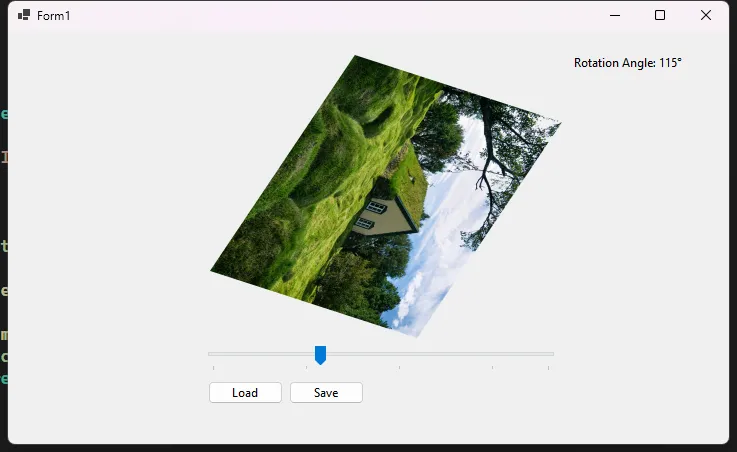
SkiaSharp 提供了强大的图像处理能力,其中图像旋转是最常用的操作之一。本文将深入探讨SkiaSharp中图像旋转的多种方法和技巧。
Nuget 安装包
C#SkiaSharp
SkiaSharp.Views.WindowsForms
基本旋转方法
简单角度旋转
C#using System.Windows.Forms;
using SkiaSharp;

namespace AppRotation
{
    public partial class Form1 : Form
    {
        private SKBitmap originalBitmap;
        private string currentImagePath;
        public Form1()
        {
            InitializeComponent();
        }

        private void btnLoad_Click(object sender, EventArgs e)
        {
            using (OpenFileDialog openFileDialog = new OpenFileDialog())
            {
                openFileDialog.Filter = "Image Files|*.png;*.jpg;*.jpeg;*.bmp;*.gif";
                if (openFileDialog.ShowDialog() == DialogResult.OK)
                {
                    currentImagePath = openFileDialog.FileName;
                    using (var fileStream = new FileStream(currentImagePath, FileMode.Open))
                    {
                        originalBitmap = SKBitmap.Decode(fileStream);
                        UpdateRotatedImage(pic, tbAngle.Value);
                        btnSave.Enabled = true;
                    }
                }
            }
        }

        private void tbAngle_Scroll(object sender, EventArgs e)
        {
            lblAngle.Text = $"Rotation Angle: {tbAngle.Value}°";
            if (originalBitmap != null)
            {
                UpdateRotatedImage(pic, tbAngle.Value);
            }
        }

        private void btnSave_Click(object sender, EventArgs e)
        {
            if (originalBitmap == null) return;

            using (SaveFileDialog saveFileDialog = new SaveFileDialog())
            {
                saveFileDialog.Filter = "PNG Image|*.png|JPEG Image|*.jpg|BMP Image|*.bmp";
                saveFileDialog.DefaultExt = "png";
                saveFileDialog.AddExtension = true;

                if (saveFileDialog.ShowDialog() == DialogResult.OK)
                {
                    using (SKBitmap rotatedBitmap = RotateImage(originalBitmap, tbAngle.Value))
                    {
                        using (SKImage image = SKImage.FromBitmap(rotatedBitmap))
                        using (SKData data = image.Encode(SKEncodedImageFormat.Png, 100))
                        using (FileStream stream = new FileStream(saveFileDialog.FileName, FileMode.Create))
                        {
                            data.SaveTo(stream);
                        }
                    }
                    MessageBox.Show("Image saved successfully!", "Success", MessageBoxButtons.OK, MessageBoxIcon.Information);
                }
            }
        }

        private void UpdateRotatedImage(PictureBox pic, int angle)
        {
            if (originalBitmap == null) return;

            using (SKBitmap rotatedBitmap = RotateImage(originalBitmap, angle))
            {
                using (SKImage image = SKImage.FromBitmap(rotatedBitmap))
                using (SKData data = image.Encode())
                using (MemoryStream memStream = new MemoryStream())
                {
                    data.SaveTo(memStream);
                    memStream.Position = 0;

                    if (pic.Image != null)
                    {
                        pic.Image.Dispose();
                    }

                    pic.Image = new Bitmap(memStream);
                }
            }
        }

        public SKBitmap RotateImage(SKBitmap originalBitmap, float angle)
        {
            // 创建一个新的位图,大小适应旋转后的图像
            SKBitmap rotatedBitmap = new SKBitmap(
                (int)(Math.Abs(originalBitmap.Width * Math.Cos(angle * Math.PI / 180)) +
                      Math.Abs(originalBitmap.Height * Math.Sin(angle * Math.PI / 180))),
                (int)(Math.Abs(originalBitmap.Width * Math.Sin(angle * Math.PI / 180)) +
                      Math.Abs(originalBitmap.Height * Math.Cos(angle * Math.PI / 180)))
            );

            using (SKCanvas canvas = new SKCanvas(rotatedBitmap))
            {
                // Clear canvas with transparent background
                canvas.Clear(SKColors.Transparent);

                // 将画布中心移动到图像中心
                canvas.Translate(rotatedBitmap.Width / 2f, rotatedBitmap.Height / 2f);

                // 旋转画布
                canvas.RotateDegrees(angle);

                // 绘制原始图像,使其居中
                canvas.DrawBitmap(originalBitmap,
                    new SKPoint(-originalBitmap.Width / 2f, -originalBitmap.Height / 2f));
            }

            return rotatedBitmap;
        }
    }
}